If your RØDECaster Pro II or RØDECaster Duo is not powering on, it can be frustrating, especially when you’re eager to start recording or streaming. However, several troubleshooting steps can help identify and potentially resolve the issue. These steps will help determine whether the problem lies with the device, the power supply, or the connection.
- Ensure that the power supply cable is connected to the correct USB-C port on your RØDECaster device. Only one USB-C port is intended for power input.
Please note: Do not connect the power supply to USB1 or USB2.
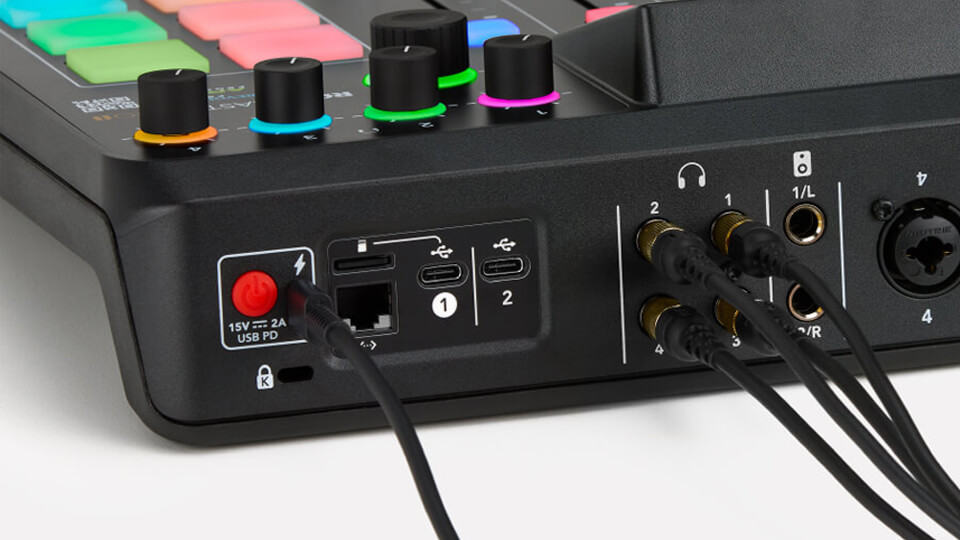
- Always use the official RØDE power supply designed specifically for the RØDECaster. This ensures the correct voltage and current are supplied.
- When powering on the RØDECaster, firmly press the red power button located on the rear of the device.
- Try plugging the RØDECaster’s power supply into a different power outlet. The issue may be due to a faulty wall socket, power board, or loose connection.
- Test the power supply with another USB-C device (such as a smartphone or tablet). If the device does not charge, the power supply may be faulty or damaged.
If you're still having issues with the product, please reach out to our Service Team via the contact page for further assistance.