If you are experiencing a buzzing sound from your monitor speakers while using the RØDECaster Pro II or RØDECaster Duo, it’s essential to consider the type of cables you are using for the connection.
Balanced Audio Cables
When connecting these audio interfaces to your monitor speakers through the 1/4" outputs, it is crucial to utilize balanced cables. Balanced cables are specifically designed to reduce interference and noise, ensuring a cleaner audio signal.
How do I know if my cables are balanced or not?
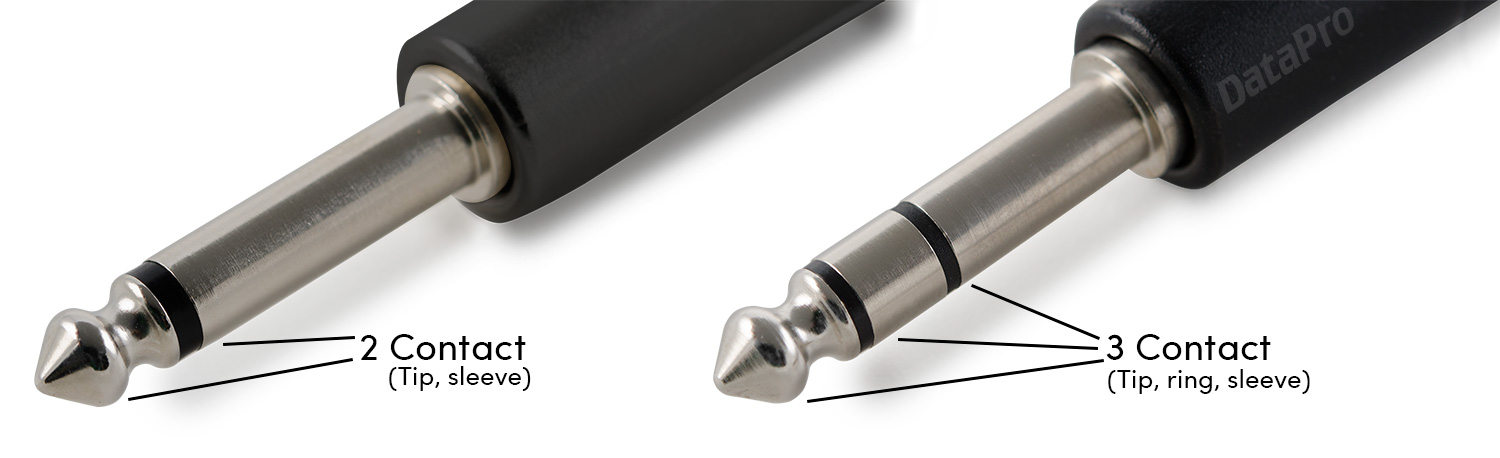
Balanced cables are identified by having three-pin XLR connectors or 1/4'' TRS (Tip-Ring-Sleeve) jacks with two insulating rings (pictured below), rather than the single ring found on unbalanced TS cables.
Ground loop
Additionally, the buzzing sound could also stem from other factors such as improper grounding or issues with the audio setup. It’s advisable to check the entire signal chain, including the power sources and any other connected devices, to rule out any potential sources of interference.
If possible, try connecting the RØDECaster to a different power board to see if the issue persists.
How to confirm the hum is caused by a ground loop
To confirm the issue is being caused by a grounding issue, you can review an audio recording from the monitor outputs using a graphic EQ to see if you can see the audio issue at specific frequencies such as 50/60hz.
Note: If you are in the USA, the ground hum will be 60hz. If you are in the UK/EU, it will be 50hz.
If you're still having issues with the product, please reach out to our Service Team via the contact page for further assistance.